 Uttam Marandi, Principal Engineer at Crescentic
The PR landed in my inbox at 2:47 AM. I hadn't written it. I hadn't even filed the issue it was attached to.
A few hours earlier, I'd dropped a PRD into Multica and gone to bed. By the time I woke up, there was a branch, an implementation, a green test suite, and a PR sitting in "merge ready." All that was left for me was the review.
I want to be careful here: this isn't a story about an AI tool that does your job while you sleep. It's a story about a workflow change that I spent a frustrating few months trying to put together with other tools before this one finally clicked.
1. The mess I started from
For most of last year I had a recurring problem: too many tracks, too few hands.
Three browser windows. A Notion doc I couldn't find. Two PRDs in different states of done. A branch called temp-fix-2 that I'd renamed from temp-fix and could no longer explain to anyone, including myself. The work wasn't blocked on me thinking — it was blocked on me switching. Every context switch cost ten minutes. Every dropped thread cost a day.
I tried the obvious things. We use Paperclip at Crescentic for product ops, and on paper it should have helped. But Paperclip is built around the assumptions of a typical org — assignees, standups, status updates, the things you do when humans are doing the work. What I needed was something that assumed the workers were agents, not people: lots of them, running in parallel, picking up small well-scoped tasks without me hand-holding the handoff.
That's what dragged me into trying Multica.
2. What I was actually looking for
I want to be precise about the goal, because I don't think "I wanted an AI to code for me" is right. I had Claude Code. I had Cursor. Those handle the coding part fine.
What I didn't have was a way to run, say, four tracks at once where I wasn't the bottleneck at every handoff. The mental model I kept sketching on paper looked like this: write a spec, let something break the spec into tasks, let those tasks get routed to the right specialists, and have the work flow back to me only when it was ready for a decision.
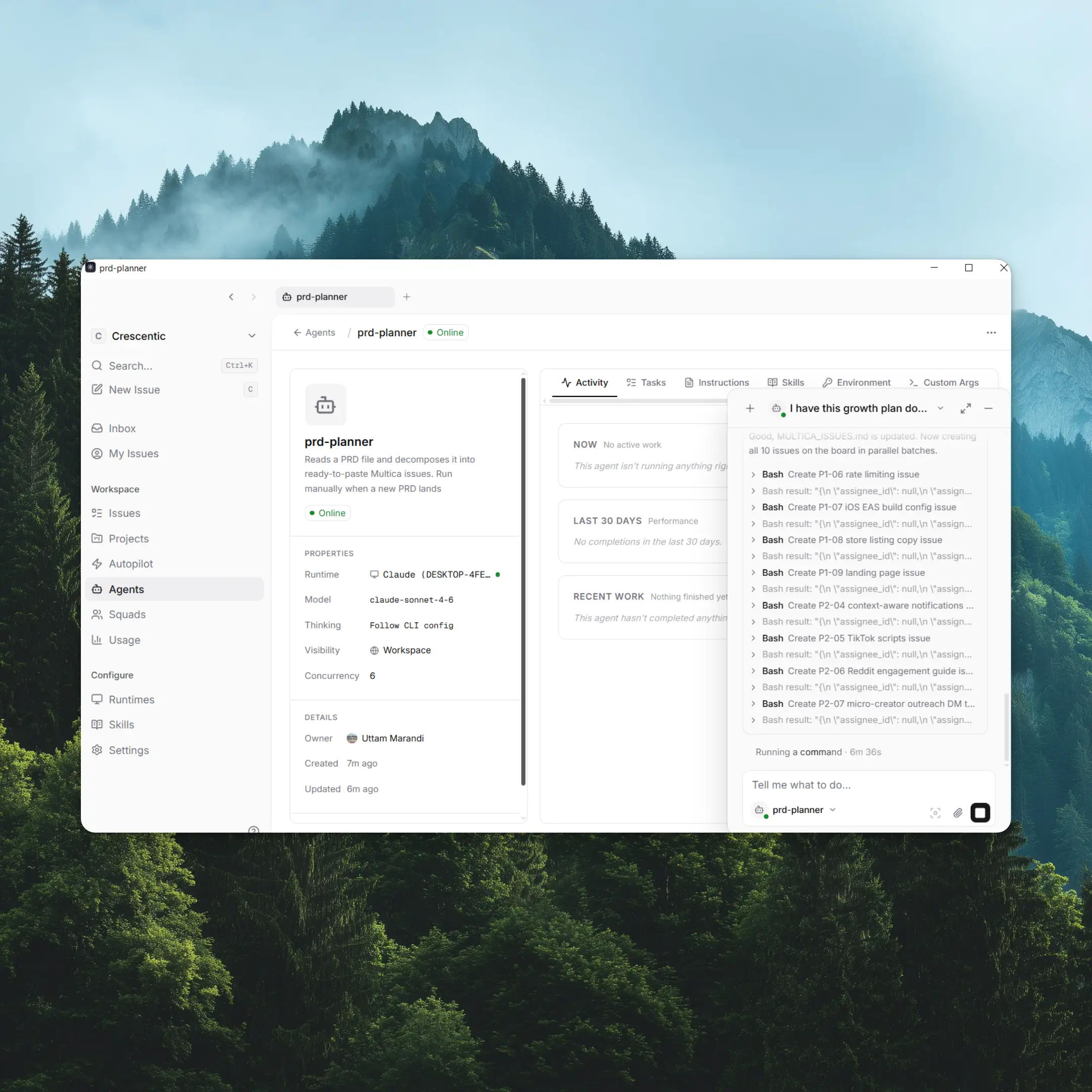
The piece I'd been missing wasn't the agents — it was the router. Multica's admin agent is the thing that reads the PRD, decides what tasks exist, and assigns them. I stopped being the dispatcher.
3. What actually happens when you press go
The first time I watched it run a real task end-to-end, I sat there reading the activity feed like it was a sports match.
The developer agent picked up an issue I'd never opened myself. It opened a branch. It wrote the code. It ran the test suite locally, fixed a lint issue I would have missed, pushed the branch, and opened a PR. Somewhere along the way the issue status flipped from in progress to in review and finally to merge ready as the checks came back green.
None of those steps are remarkable on their own. I do them every day. The thing that mattered was that several of these loops were happening at the same time, on different parts of the same PRD, while I was finishing breakfast.
4. Where Multica fits versus everything else I tried
I'm going to put this in a table because my lead asked for one, and honestly it's clearer this way:
| What I needed | Generic PM tool (Paperclip etc.) | Just running Claude Code locally | Multica |
|---|---|---|---|
| Spec → tasks broken down automatically | No | No (you prompt each task) | Yes |
| Multiple agents working in parallel | N/A | Hard to orchestrate | Yes |
| Tasks routed to specialists by skill | Manual assignment | No | Yes |
| GitHub branch + PR opened by agent | No | Possible but you wire it | Yes |
| Reusable, codebase-aware "how we do things" | Docs nobody reads | Lives in your prompts | Skills shared across the workspace |
| Suitable for one task at a time | Yes | Yes | Overkill |
The honest line is that for a solo task, Claude Code is fine. Multica earns its weight when you've got several agents and several tracks, and the same "how do we deploy staging" question would otherwise get answered four slightly different ways.
5. Why one big agent doesn't beat several small ones
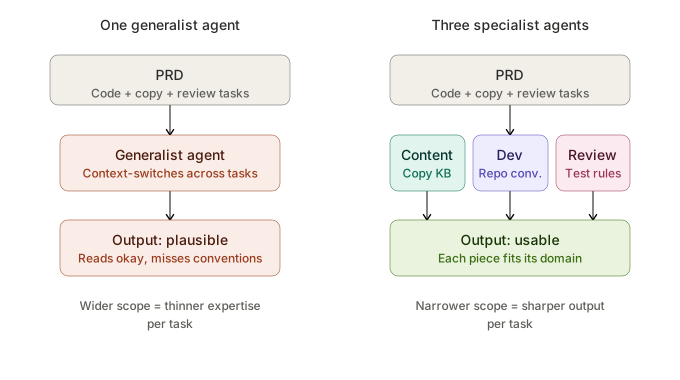
Early on I assumed a single capable agent would handle everything. That's wrong, and the reason it's wrong is the same reason it's wrong for human teams.
A writer agent with a narrow scope and a knowledge base of past copy gets the tone right. A developer agent that lives inside the repo's conventions writes code that fits the codebase — naming, error handling, where tests go. The minute you ask a single agent to do both, the output drifts toward "plausible" instead of "correct."
Specialization isn't an architecture preference. It's a quality control.
6. The week the skills system clicked
For the first week I treated Multica as a smarter task router. Nice loop, but nothing I couldn't have stitched together with shell scripts and patience.
Week two is when it started compounding.
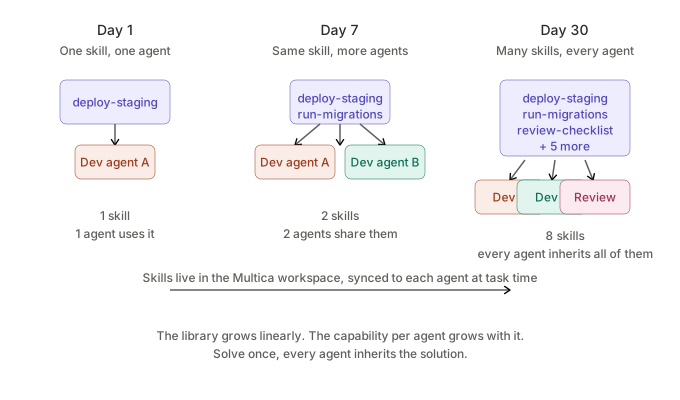
One of the developer agents worked out a clean deploy-to-staging flow that I'd been half-doing manually for months — the kind of thing where the "real" docs are a Notion page nobody, including the author, ever reopens. Instead of letting that knowledge die in a one-off PR, I saved it as a skill in the Multica workspace — a SKILL.md plus the supporting scripts, all stored against the workspace and available to every agent on the team.
A few days later, a completely different agent — working on a completely different feature — needed to push to staging. It didn't re-derive the flow. It didn't ask. The deploy-staging skill was attached to its profile, Multica synced it down to the agent at task time, and the agent ran it.
That was the moment the system stopped feeling like task automation and started feeling like a team with shared memory.
The mental shift: every problem an agent solves can become a capability the whole team inherits. Day one, you teach an agent to deploy. Day thirty, every agent deploys, follows your migration conventions, and runs your review checklist without being told. Solve it once, and the next agent that needs it pulls the skill from the workspace instead of starting over.
The catch — and this is real — is that nothing about this is automatic. You spot the pattern, you write the SKILL.md, you save it to the workspace, you attach it to the right agents. I missed this for the first few days and wondered why nothing was compounding. The library is real, but you build it.
7. What I'd tell a teammate starting today
Three things, in order of how much they'll save you:
- Write the PRD like the next reader has no context. Because the next reader is the admin agent, and "you know what I mean" is not a thing it knows.
- Don't over-specialize agents on day one. Start with the obvious split — writing and implementation. Let real usage tell you where to add the next agent.
- Trust the loop. The first few times an agent opens a PR without you, you'll want to step in mid-stream. Don't. Review at the merge gate.
8. The honest tradeoffs
I've been talking up the loop, so it's only fair to say where it gets thin.
- You're still steering more than the marketing suggests. I write the PRD. I sanity-check the task breakdown before the agents kick off. The "agents as teammates" framing is useful but it's a metaphor with limits — don't expect Multica to advance the workflow on its own, expect it to execute once you've shaped it.
- Skill curation is manual. I made the case for skills above, but: nothing about them emerges automatically from agent runs. You spot the pattern, you write the YAML, you commit it. Without that work, no compounding.
- Logs are thin when things go wrong. When an agent succeeds, you see the comments and the PR. When it fails subtly, you also see the comments and the PR — just with a quietly wrong implementation underneath. The runtime logs aren't surfaced well in the UI yet. I've been burned twice — both times because the surface report looked clean and the PR compiled, but the spec was missed. Read the diffs.
- It's early software. I'm running it because the upside is real and I'm willing to put up with version churn. If you need rock-solid tooling, you're early. Read the GitHub issues, expect to occasionally restart the daemon.
- It's overkill if you're solo, single-task. If you're running one agent on one thing, use the CLI directly. Multica's weight only pays off when you've got multiple agents, teammates who don't know what's been automated, and the same fix being re-derived in three different prompts. Before you hit that wall, you're managing a system instead of getting work done.
9. The skeptical read
I'll steelman it: Multica is a project board with an integration that routes tickets to Claude Code instead of to a human. That description is fair on the mechanics. Whether it counts as a new category or just a very good integration depends on whether you take the skills layer seriously.
For me, the skills are what made it stick. If I were only using the routing, I'd probably have churned by month two. Your mileage will track how seriously you build out the skill library — that's where the compounding lives.